Override vs Overtake: When to Use Each in IFS Cloud
Understanding the critical difference between @Override and @Overtake in IFS Cloud customisations — with real examples and why getting it wrong creates upgrade headaches.
Published
Override vs Overtake: When to Use Each in IFS Cloud
One of the most consequential decisions in an IFS Cloud source customisation is whether to @Override or @Overtake an existing element. Get it wrong, and a small requirement can create disproportionate work at every update. Get it right, and the change remains understandable, testable, and much easier to reconcile with later IFS code.
This guide cuts through the confusion with clear examples, real-world decision rules, and the upgrade implications that matter.
The Fundamental Difference
IFS Cloud uses a layered architecture to separate IFS-delivered source from the customer layer. The exact layers and generated signatures depend on the component and target release, so inspect the element in Developer Studio before adding either annotation.
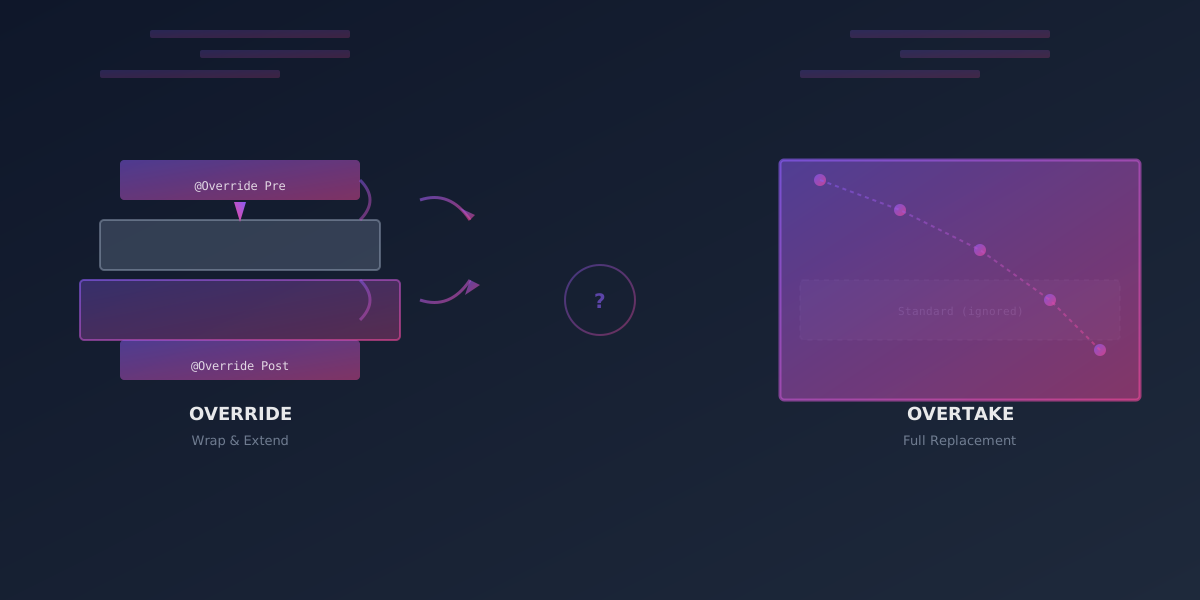
@Override: Add Code Before or After
@Override lets a higher layer redefine an existing element and, for PL/SQL methods, call the lower-layer implementation with super(...). That makes before/after logic the common use case.
Key characteristics:
- Call the underlying implementation with
super(...)when the standard behaviour must remain - You cannot change logic in the middle of the method
- You take no ownership of the underlying code
- Lower-layer fixes remain in the call path, but the override still needs update analysis and regression testing
@Overtake: Replace the Entire Method
@Overtake means you replace the entire method with your own version. The standard code is completely ignored. You own all the logic now.
Key characteristics:
- You do not call the underlying layer's code
- You can change anything — the entire method is yours
- You take full ownership of the code
- Upgrades are painful — you must manually merge changes from each release
Why This Matters: The Upgrade Trap
Here's where most teams stumble: IFS Cloud releases new features, bug fixes, and optimisations regularly. If you overtake a method, you don't automatically benefit from those improvements. Instead, you have three painful options:
- Stay behind and miss critical fixes
- Manually merge every change with your customisation
- Overtake again after each upgrade (expensive, error-prone)
With @Override, the lower-layer implementation remains in the execution path. That normally makes reconciliation simpler, but it does not make an override automatically compatible with a changed signature, data model, or business invariant.
As IFS explicitly states in their best practices: "Use @overtake as a last resort only since when you do this you effectively branch the standard code, creating your own copy of it inside your customization and taking responsibility for keeping this code updated with regards to any changes in the standard code in future releases."
When to Use @Override (The Preferred Approach)
Use @Override whenever you can. These are the scenarios where it works:
1. Adding Pre-Processing Logic
You need to validate or prepare data before the standard method runs.
Example: Validating a purchase order before it's created
The source below shows the real shape of a customer-layer PL/SQL override. Method names and signatures are generated from the target logical unit, so copy them from that release rather than from an article.
2. Adding Post-Processing Logic
You need to react after the standard code executes — e.g., triggering integrations, updating custom tables, or sending notifications.
Example: Notify an external system after an order is saved
Queue durable integration work rather than making a slow remote HTTP call while the IFS transaction is open. The queue insert then commits or rolls back with the order.
3. Extending Client Elements
Client-model elements can also be overridden in the customer layer. For example, an existing list can be extended or a field property can be changed using the syntax supported for that element in the target release:
Do not use a client filter as a security boundary. Record-level access belongs in the projection/entity business-access design so the same rule applies to page, API, export, and integration consumers.
When to Use @Overtake (Only When Necessary)
Use @Overtake only when @Override genuinely cannot solve your problem. These are rare scenarios:
1. Changing Logic in the Middle of the Method
The standard code has a complex flow, and you need to inject logic in the middle — not before, not after.
Example: Rewriting a WHERE clause in a query-based method
2. When the Element Cannot Be Incrementally Extended
Whether a projection or client element supports @Override, and which properties can be changed, is defined by that element's source grammar. It is not correct to say that all commands must be overtaken. A custom command can often call a new projection action while leaving the standard command untouched; an existing list can be overridden without duplicating the entire page.
Before overtaking a client or projection element, check the Developer Studio reference for that element, then prefer a new action/command, fragment, assistant, configuration, workflow, or event if it meets the requirement. A client command must not contain SQL, and business state changes must go through server-side business logic rather than direct table updates.
3. Tree Controls and Complex Structures
Trees and other compound client elements have element-specific extension rules. Some changes can be made by overriding a supported sub-element; others require replacing a larger definition. Verify the target release's client syntax rather than treating every tree as a mandatory overtake.
4. Modifying Existing Fields in Lists
Supported field properties can be changed in an overridden list or fragment. If Developer Studio rejects the requested refinement, consider a new list/fragment or a deliberately scoped overtake; do not assume an override always creates duplicate fields.
The Decision Tree
Not sure which to use? Follow this logic:
Can you solve it by adding code
BEFORE the standard method?
├─ YES → Use @Override with pre-processing
└─ NO
   └─ Can you solve it by adding code
      AFTER the standard method?
      ├─ YES → Use @Override with post-processing
      └─ NO
         └─ MUST you change the middle
            of the method?
            ├─ YES → Use @Overtake
            └─ NO → Reconsider your design
               (there might be a better way)
Real-World Maintenance Scenario: The Upgrade Trap
Scenario: You overtook a method to add custom validation. Two years later, IFS releases v25 with a critical security fix in that exact method.
With @Override:
- The changed lower-layer method normally remains in the call path
- Update analysis shows whether its signature or surrounding contract changed
- Your custom validation still needs focused regression testing against the update candidate
- The team confirms that the security fix is not bypassed by the higher-layer logic
With @Overtake:
- Your overtaken method doesn't include the fix
- You don't even know about it until someone discovers the vulnerability
- You must manually review the diff, merge the fix, test, and deploy
- Days or weeks of work, security risk in between
This is why the decision matters. One choice scales smoothly; the other becomes a growing debt.
The security distinction is important but should not be overstated. An override is not proof that every lower-layer fix is effective: it might reject a new parameter, replace a value after super(...), or preserve an assumption that the fix deliberately changed. The benefit is that the standard implementation is still present to inspect and exercise. An overtake requires an explicit merge decision because the customer copy is the implementation that executes.
Real-World Examples: When Each Approach Shines
Override Example: E-Commerce Order Validation
You're building a custom validation layer for orders placed through your e-commerce portal. The standard IFS method creates the order, but you need to:
- Check inventory across multiple warehouses
- Apply custom pricing rules based on customer segment
- Verify credit limits against a third-party system
- Log the transaction to your compliance system
You cannot skip the standard IFS order creation (it updates critical tables, triggers workflows, etc.), but you need to add your checks first.
Solution: validate at a documented server extension point, using @Override where the generated method supports it
Check_Insert___ is representative, not a portable signature: use the generated source in the target release. Keep remote credit checks out of the database transaction; cache an approved decision or use an explicit orchestration step with defined failure behaviour.
Why override works: You're not changing how IFS creates orders, you're just wrapping it with your business rules.
Overtake Example: Complex Pricing Logic
Now imagine a different scenario: your company has a proprietary pricing algorithm that IFS's standard calculation doesn't support. The algorithm:
- Uses AI/ML scoring based on historical data
- Applies dynamic pricing based on market conditions
- Considers competitor pricing in real-time
- Applies complex discount matrices that IFS views don't support
You cannot pre-calculate and post-calculate your way around this — the IFS standard pricing logic will always run and produce the wrong result.
Solution: @Overtake the pricing method
Why overtake is necessary: There's no way to wrap this logic; you need to replace the pricing calculation entirely.
Practical Tips for Clean Customisations
1. Keep Overtakes Surgical
There is no general $SEARCH/$REPLACE Marble construct that patches a few lines inside a PL/SQL method. If the target element has no supported refinement point, overtake the smallest stable sub-method possible and record the exact lower-layer revision on which it was based.
2. Challenge the Requirement Before Copying Code
An overtake is a source-level answer, but many requirements are better solved elsewhere. Work through this shortlist with the business owner and solution architect:
- Can a standard configuration, custom field, event, workflow, lobby, report, permission set, or projection action meet the outcome?
- Can a new customer-owned element sit beside the standard element instead of replacing it?
- Is there a smaller generated method whose documented contract provides the required extension point?
- Does the rule need to apply to page users, integrations, background jobs, migration jobs, and mobile/offline flows? If so, a client-only change is insufficient.
- Does the design introduce a remote dependency inside an IFS database transaction?
- Which business invariants, validations, authorisation checks, history records, and events are currently enforced by the lower-layer code?
If the team cannot answer the last question, it is not ready to own the method. Build a call/dependency map and test the untouched standard flow first. Sometimes that analysis reveals a supported API or narrower extension point and removes the need for an overtake altogether.
3. Version Your Overtakes
If you must overtake, keep meticulous notes about which IFS release your overtake was based on. When you upgrade, you'll need to compare your overtake against the new standard code.
4. Create Test Cases for Overtakes
Because overtakes aren't automatically updated with IFS releases, they need dedicated test coverage. Each upgrade cycle, retest all your overtakes.
IFS does not turn the test procedure/assert_equals___ notation into executable tests. Implement the contract in the test tooling available to the project (for example API-level automated tests plus controlled PL/SQL tests in an authorised development environment).
5. Minimise the Scope of Overtakes
If you must overtake, overtake the smallest method possible. Don't overtake a complex orchestration method if you can overtake a simpler sub-method instead.
Bad:
Better:
6. Create an Upgrade Impact Map
Before you overtake, create a document listing:
- What you overtook — method name, module
- Why it was necessary — business requirement that override couldn't solve
- What changed — specific logic modifications
- Impact radius — what other code calls this method, what it affects
- Upgrade risk — how likely IFS is to change this method
Example:
Overtake: Calculate_Tax_Amount___
Reason: Standard IFS taxation doesn't support our regional tax rules (2 different tax zones per customer)
Changed: Added logic to determine which tax zone applies based on order delivery address
Impact: Called by Invoice_Creation, Order_Total_Calculation, Reporting views
Upgrade Risk: HIGH (IFS regularly updates tax logic to support new regulations)
Last IFS Update: v24r1 added EU VAT reverse-charge logic (we had to merge)
Next Review: v25r1 expected (changes to carbon tax reporting)
This map becomes your upgrade checklist.
For each retained overtake, keep a small evidence package in version control or the governed change system:
| Evidence | What it answers |
|---|---|
| Lower-layer baseline | Which exact IFS delivery/revision was copied? |
| Customer diff | Which statements and behaviours intentionally changed? |
| Dependency map | Which callers, tables, events, APIs, and client flows rely on it? |
| Invariant checklist | Which standard validation, security, history, and state-transition rules must remain? |
| Regression contract | Which normal, boundary, failure, concurrency, and channel tests must pass? |
| Update decision | What changed in the new IFS source, and was it merged, rejected, or made irrelevant? |
This is more valuable than a comment saying only “custom code.” It lets the next consultant distinguish deliberate business behaviour from an accidentally omitted standard change. It also makes retirement possible: when configuration or a newer standard feature replaces the requirement, the team can remove the overtake and prove which tests and consumers need to move.
7. Document Your Intentions
Use comment markers to flag where you override or overtake. This helps maintainers understand why you made that choice.
8. Avoid Over-Customising
Before you override or overtake, ask: "Is this really necessary? Does IFS have a standard way to do this?"
Often, IFS provides extensibility points, configuration options, or events that avoid the need for code customisation altogether. Check the documentation first.
9. Test Against Future Releases
Overrides usually preserve more lower-layer behaviour, but they still require update analysis and regression testing. Overtakes require active maintenance—plan for re-validation after each release.
The Marker Snippet Pattern
Maintain normal customer-layer history comments and change-record links, and use Update Analyzer plus source comparison to identify affected customisations. Update Analyzer does not depend on a magic IFS-APF LAA marker around each override.
These markers help human reviewers locate the customer intent in generated source and connect it to the change record. Update Analyzer and the build/update tooling identify customisations from the delivered source metadata and comparisons, not from this particular comment text.
Key Takeaways
-
Prefer @Override. It normally preserves more of the standard call path and is easier to reconcile, but it is not exempt from upgrade testing.
-
Use @Overtake only when you must change the middle of the method. If pre/post processing works, use it.
-
Overtakes are technical debt. Every overtake you retain is a promise to maintain that code through each adopted update cycle.
-
Trace the lower-layer change. An override normally executes the updated lower-layer method; an overtake does not. In both cases, check signature and semantic changes.
-
Test your design. Before you decide on either approach, ask yourself: "Is there a standard IFS extension point that does this already?" Often there is. Check IFS's exits, hooks, and customisation points before resorting to override or overtake.
-
Minimise the copied surface. If you must overtake, choose the smallest appropriate element and retain a source baseline for comparison.
-
Document why. Whether you override or overtake, document why you chose that approach. Future maintainers (including yourself) will thank you.
The Upgrade Lifecycle: What Happens With Each Approach
Let's walk through a realistic scenario: IFS releases v25 with changes to the Calculate_Line_Price___ method.
If You Used @Override:
- Update Analyzer identifies the customisation and relevant lower-layer changes
- The team checks generated signatures and the behaviour around the
super(...)call - Automated and business-process regression tests run against the update candidate
- Any new lower-layer preconditions, outputs, or side effects are reconciled before deployment
If You Used @Overtake:
- Update Analyzer and source comparison identify changes in the overtaken element and its dependencies
- The team compares the new complete lower-layer implementation with the customer-owned copy
- Required fixes, security changes, invariants, and performance improvements are deliberately merged
- The full regression contract runs before deployment
- The approved baseline and review evidence are updated
The exact effort depends on how much the lower layer changed and the quality of the regression suite; invented eight-versus-eighty-hour ratios do not help a design decision. What does compound is the number and size of customer-owned copies that must be reviewed at every adopted release.
Closing Thought
Every @Overtake is a fork in the road. You're creating a branch of IFS code that's now your responsibility to maintain, integrate with, and reconcile for as long as the customisation remains in use. Sometimes it's necessary. Most of the time, it's not.
Choose wisely. Your next upgrade depends on it.
Need a second opinion on an IFS Cloud customisation decision?
Syrett Consultancy helps teams weigh override, overtake, and extension options before they create long-term upgrade debt.